
One system, not seven
Sales, purchases, the books, payroll, inventory, and assets share one set of records. A figure on the dashboard traces back to the document that produced it, because it is the same document.
Built for small business
Butterpie. Business, easy as pie.Butterpie. Nothing half-baked.Butterpie. All the right ingredients.Butterpie. One system. The full menu.Butterpie. Your bread and butter, handled.Butterpie. The kitchen behind your business.Butterpie. The recipe for a well-run company.Butterpie. Made to rise.
Invoices and VAT, the KPiR or full books, payroll, inventory and fixed assets — and the filings that follow from them. Butterpie keeps the record straight so the month closes without a scramble.
Create an accountSee pricingWhat is included
Start free. Add your NIP and your KSeF certificate when you are ready to issue.
Try the demo — pick a company
NewCo — a growing companyKawiarnia Okruszek — a café in trouble
Two worked example companies with real books, read-only — no account needed.
Short videos recorded in a copy of our demo company, NewCo sp. z o.o.: a KSeF e-invoice, the month's JPK_V7, a new business partner, the dashboards — and the assistant, typed and spoken.
A KSeF e-invoice, start to finish Length
Issue a sales invoice, send it to KSeF, and watch the status and the KSeF number come back to the invoice. Recorded in the test sandbox, with a simulated KSeF response.
The voices in this video are AI-generated.
Let's send an e-invoice to KSeF, Poland's national e-invoicing system. Watch how fast this is!
Pick the buyer, and the due date fills in from their payment terms.
Add a training day and catering for twenty, with VAT at twenty-three and eight percent, calculated as you type.
Save the draft and choose where it goes: production or, for this demo, the test sandbox.
Now issue it! Butterpie builds the structured e-invoice KSeF expects and sends it off for you.
Here's the KSeF screen. Status: Accepted, and there's the KSeF number!
Open it: the status, the KSeF number and the UPO receipt, all kept on file.
Need a readable copy? Download the filed e-invoice, in Polish or in English.
Invoices to KSeF in seconds. Try the Butterpie demo today!
The month's JPK_V7 Length
Build JPK_V7 from the registers you already keep, check it against the ministry's schema, and download the file.
The voices in this video are AI-generated.
Month-end VAT in a minute! Let's build August's JPK V7, the monthly VAT file, straight from the registers.
Here are your JPK files, period by period.
Pick the closed month, press Generate, and Butterpie builds the file in the format set by Poland's Ministry of Finance.
Then check it against the ministry's published schema. Green light: the structure checks out.
Open the VAT-7 return: output VAT, input VAT and the amount due, every figure straight from the books.
Download the file and submit it with the ministry's own software or through your accountant. Then record the UPO receipt back in Butterpie.
The JPK, minus the stress. Try the Butterpie demo!
A new business partner Length
Add a counterparty with a checked NIP, find it in your list of counterparties, and use it on your next invoice.
The voices in this video are AI-generated.
A new customer? Let's add them. It only takes seconds!
A short code, the company name and the Polish tax ID, the NIP. Butterpie verifies its check digit, so typos get caught before they reach an invoice.
Then the address: street, number, postal code and city.
Set their payment terms once: bank transfer, fourteen days.
Save, and there they are, right in your list of counterparties.
Their page will list every document you exchange with them.
Now put them to work: pick them on a new invoice, and the payment method and due date fill in automatically.
Set it once, use it everywhere. Try the Butterpie demo!
Dashboards, and the detail behind every tile Length
From the overview to a tile, and from the tile to its report: range, grouping, comparison, filters and downloads.
The voices in this video are AI-generated.
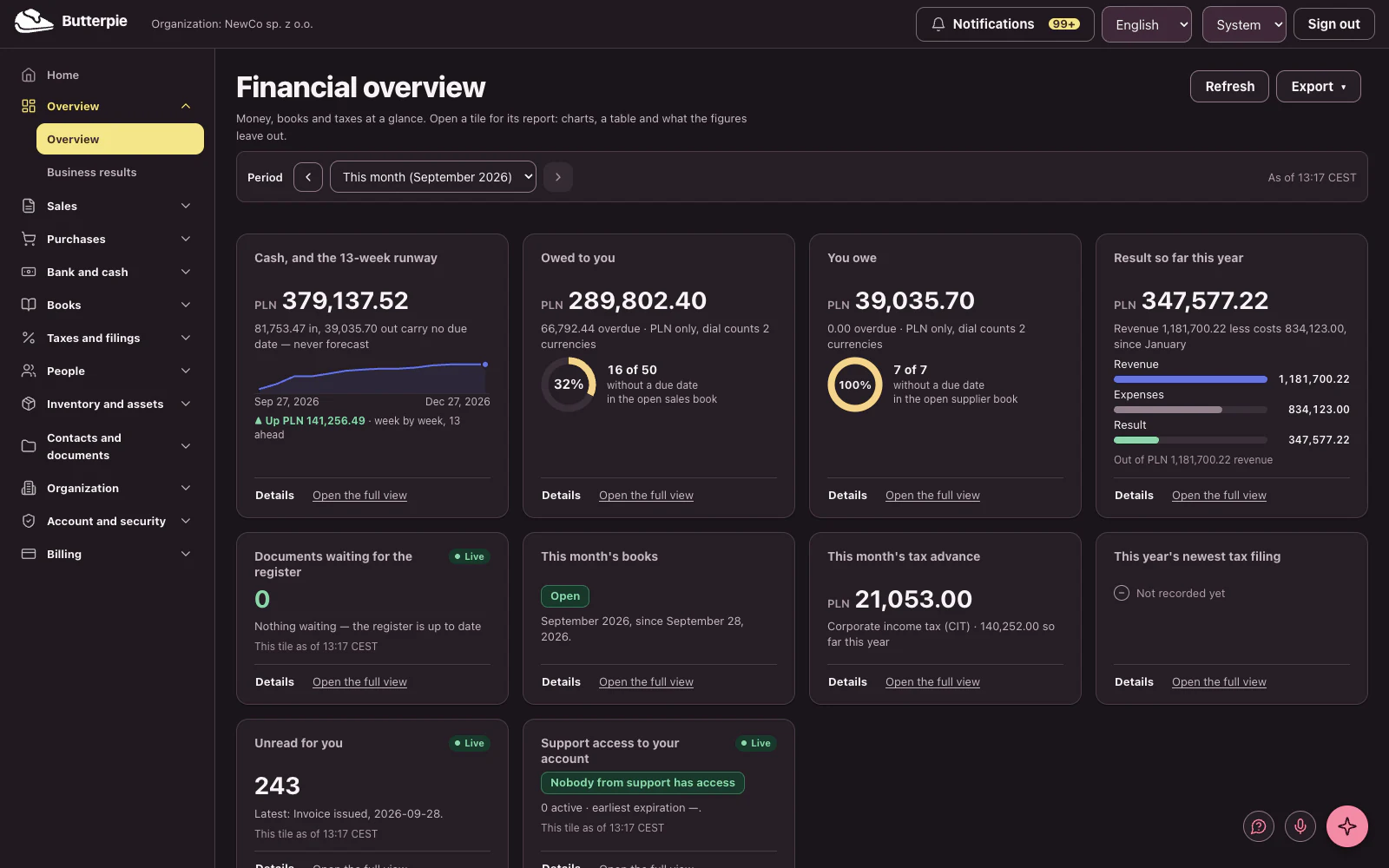
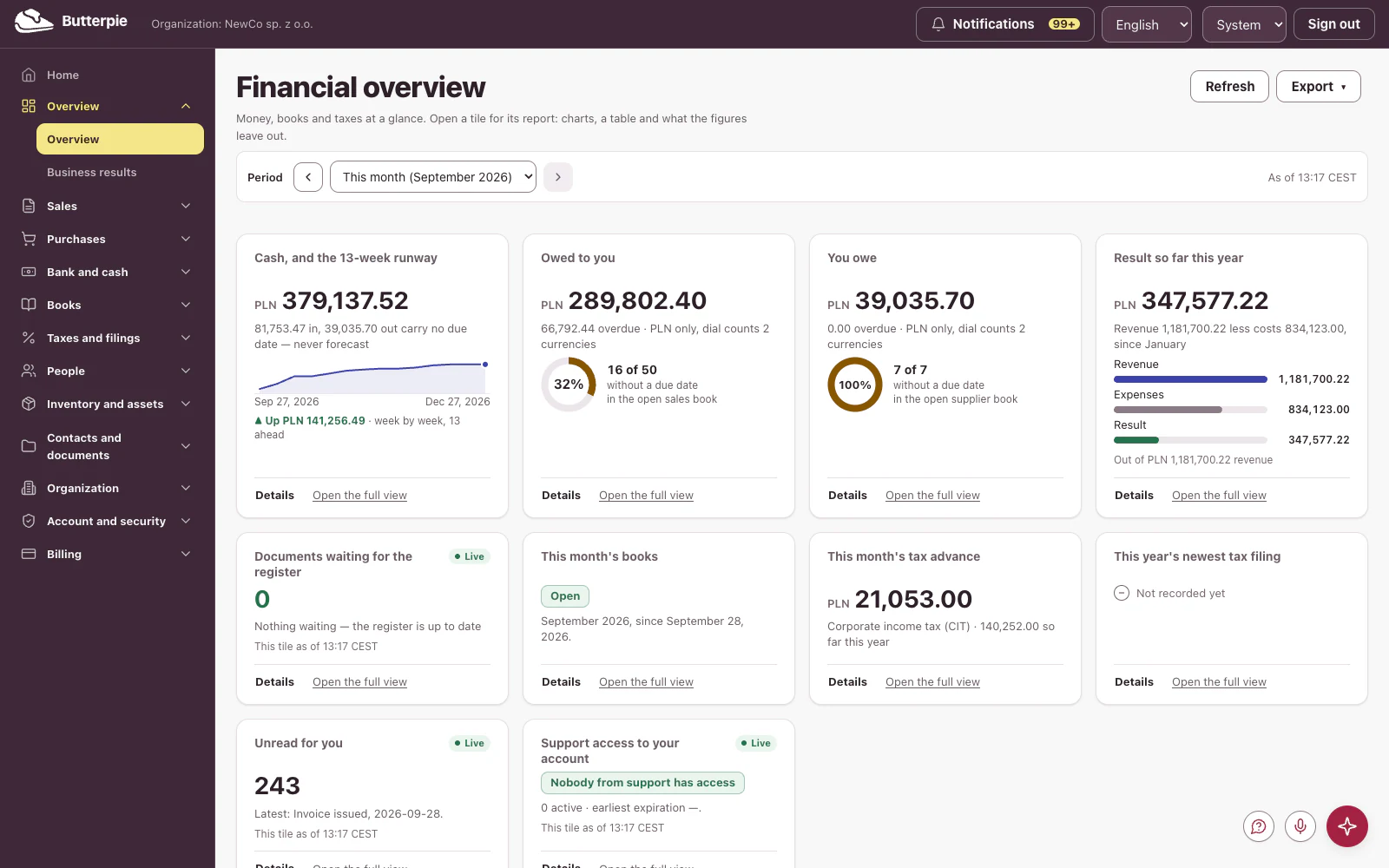
This is your business at a glance! Cash and a thirteen-week runway, what you're owed, what you owe, and your result for the year so far, all read straight from the books.
Step back a month, and the monthly tiles follow.
Every tile opens into a full report. Here's the cash runway, week by week.
Over to sales: what customers owe you, month by month.
Change the range, group by quarter, compare with the previous period…
Flip to a table, and export it: PDF, CSV, or a link that opens exactly this view.
Thirteen dashboards, one for every area: sales, purchases, bank, taxes, people, inventory and more, all from one set of books.
Your numbers, finally easy to read. Try the Butterpie demo!
Ask your data Length
Type a question on any screen and get the figures back, with the records they came from.
The voices in this video are AI-generated.
Meet your assistant! It lives on every screen, right here in the corner.
Open it, and it already knows which screen you're on, with questions ready to go.
How much do customers owe us right now? A straight answer, with the figures, from your own books.
And answers come with their sources. One click opens the screen behind the numbers.
Or just type, in plain words. Our best customers this year? Done.
Move around, and the conversation comes with you. It even knows which record you're looking at.
Every answer is labeled with how well your records back it up. And the assistant sees only what your role can already see.
Your books, one question away. The assistant comes with the Pro plan. Create your account and ask away!
Talk to your data Length
Ask out loud, hear the answer, and see it on screen with its sources.
The voices in this video are AI-generated.
Narrator: No time to type? Just talk! Click the microphone. A red line and a clear label show when it's listening, and it listens only when you say so.
User: How much do our customers owe us right now?
Assistant: I'll check that for you.
Assistant: As of September 28, 2026, customers owe you 289,802 PLN and 40 grosz and 3,290 euros. Of that, 66,792 PLN and 44 grosz and 1,200 euros are overdue.
Narrator: It checks your books and answers out loud, and everything lands in the conversation, sources included.
User: Which customer owes us the most?
Assistant: Checking that.
Assistant: Kwadratura Koła Software sp. z o.o. owes you the most, with PLN 72,410.10.
User: Great, thanks!
Assistant: You're welcome! Anything else?
Narrator: Talk to your data, hands-free. The assistant comes with the Pro plan. Create your account and say hello!
Help & feedback Length
Ask for help from the screen you are on, see what will be sent, and read the reply in Your requests.
The voices in this video are AI-generated.
Got a question? Help is one click away: this little circle, on every screen.
Choose Ask for help, and write your question in your own words.
Before you send, you see exactly what goes with it: a picture of your screen, which you can remove, and every detail, spelled out.
Send! Your request goes straight to Butterpie support.
When support answers, it lands right here, in Your requests. Only you and Butterpie support can see it.
Reply right in the thread, or close it when you're done. And you'll get an email whenever there's an answer.
Real help, right where you work. Try the Butterpie demo: the help circle is there too!
Sales, purchases, the books, payroll, inventory, and assets share one set of records. A figure on the dashboard traces back to the document that produced it, because it is the same document.
Registers, returns, and filings are generated from what you already recorded. Nothing is re-typed between programs, so nothing drifts between them.
KPiR, ryczałt, or full books. VAT, JPK_V7, PIT, CIT, ZUS, and KSeF. The statutory shape is the product's shape, not a plugin on top of a product built for other rules.
Twelve real screens from the product. Choose an area — this is the demo company's actual bookkeeping, not a mock-up.
Thirteen areas of the back office, not a pile of disconnected tools. Every figure on one screen came from a document on another.
Both plans are per seat, per month. The AI assistant is part of Pro; the credit it spends is a separate one-time top-up.
| Capability | Core | Pro |
|---|---|---|
| Invoicing and the sales register | Included | Included |
| Purchases, expenses, and payables | Included | Included |
| KPiR, ryczałt, or full double-entry books | Included | Included |
| VAT registers and JPK_V7 | Included | Included |
| PIT, CIT, and ZUS filings | Included | Included |
| Bank, cash, and the cash-flow forecast | Included | Included |
| KSeF inbound and outbound | Included | Included |
| Payroll, annual leave, and civil-law contracts | Not in this plan | Included |
| Warehouse and inventory valuation | Not in this plan | Included |
| Fixed assets and depreciation | Not in this plan | Included |
| AI assistant and document OCR | Not in this plan | Included |
| More than one workspace | Not in this plan | Included |
Loading current prices…
incl. VAT
Invoicing, books, VAT and the filings that follow.
Loading current prices…
incl. VAT
Everything in Core, plus the AI assistant and OCR, payroll, warehouse, fixed assets, and multi-workspace.
one-time
Loading current prices…
incl. VAT
An add-on, not a plan: a single top-up of AI credits for your workspace, valid for 12 months from purchase. Credits are spent as you use the assistant, nothing renews on its own, and you can spend them on AI-capable seats.
Prices are quoted in Polish złoty (PLN) — the same amount in every country.
The price shown is the amount charged: applicable tax in your country is already included, not added at the end. Card details go straight to our payment provider and never reach us.
Security claims are easy to write. These are the ones we can show you.
Separation between organizations is enforced by the database itself, underneath the application — so a mistake in our own code cannot read across organizations.
A support engineer needs a time-boxed grant that you approve, and every entry is recorded on your own support access log.
Records are hash-chained and append-only; the chain can be verified from inside the app.
If yours is not here, write to us — a person answers.
Yes. The demo is a complete worked company with real books, open to anyone, with no sign-up and no card. It is read-only, so you can click through everything without changing anything.
KPiR, ryczałt, or full double-entry books. The choice drives which registers, returns, and filings the product keeps for you, so you are not maintaining a book the tax office does not want.
Yes, inbound and outbound. A KSeF number is recorded against the invoice it belongs to, so the register and the national system name the same document.
From the registers you already keep. JPK_V7, the VAT returns, PIT, CIT, and ZUS are generated from your own documents rather than re-entered, which is what stops two systems disagreeing about one month.
Separation between organizations is enforced by the database itself rather than by application code, so a mistake in the code cannot read across organizations. A support engineer needs a time-boxed grant that you approve, and every entry appears in your own support access log.
A full export in an open format, and erasure that reaches backups on a published schedule. Both are yours to run; neither requires asking us.
The amount shown on the pricing page is the amount charged — the tax due in your country is already included, not added at the end. The subscription is sold through a payment provider that acts as seller of record and handles the tax; your card details go to them and never reach us.
Step into the demo organization, or write to us about the books you keep today.
Questions about fit, migration, or pricing — write and a person will answer. If you are signed in, we will see which user account wrote and reply there.